


News
Comment trouver et gérer les erreurs 404 de son site
Over time, a website evolves, and so do other sites, so it's common to accumulate 404 errors (page not found). This can be caused by URLs that have changed or disappeared on your site, but also by the same changes on your external links. Let's see why and how to fix 404 errors. Why fix 404 errors? For your visitors: What could be more annoying than landing on a 404 page when clicking a link? It gives a bad impression of your site, which is immediately seen as not being up to date. Incidentally, this could cause you to lose sales on an e-commerce site, for example. For Google: A site with too many external 404 errors (links to non-existent external pages) is probably not seen as very up to date. But above all, external sites may link to you, and those links may point to error pages. And then you lose everything: the visitor, and the "link juice" that improved your ranking. How to fix these errors? Internal 404 errors The first thing to do is check whether you are creating these errors yourself. For this, you can use software like Screaming Frog. It's a crawler that will scan your site and return a lot of information, including your broken internal links. The free version only crawls 500 URLs of your site, but that's a start. 1/ I enter my site's URL and click "Start", then let it run. 2/ I click on the "Internal" tab. 3/ I click on the "Status Code" column to sort the codes. 4/ When I see a 404, I click on the line. 5/ I choose the "Inlink" tab in the bottom table. 6/ The detail tells me on which page my broken link is located and which page it points to. I can then go and fix the link on my site that points to an error. This is likely the case, because the linked page no longer exists or has changed URL. See the example below for details.

L’audit SEO permet d’identifier les erreurs techniques qui pénalisent votre site web dans les résultats de recherche, comme les erreurs 404, les problèmes d’indexation ou les redirections mal configurées.

I heavily emphasize this step, because it will be much easier to move on to the next steps if there are no more 404 errors generated by our own site. In practice, by clicking on the "External" tab you will see that, in the same way, you will display the details of links from your site to pages that no longer exist on external sites. What Google sees of our 404 errors. Because Google is generally the main search engine we care about and it provides a tool for this, we will use it (even if it's not perfect): Google Webmaster Tools (now Google Search Console). This will allow us to know about external incoming links that point to pages on our site that no longer exist. 1/ Log in to your Google account and go to Google Webmaster Tools. Choose the site in question if you have several on your account. 2/ In the left column, click on "Crawl" then "Crawl Errors". Google will display a list of errors it has found.
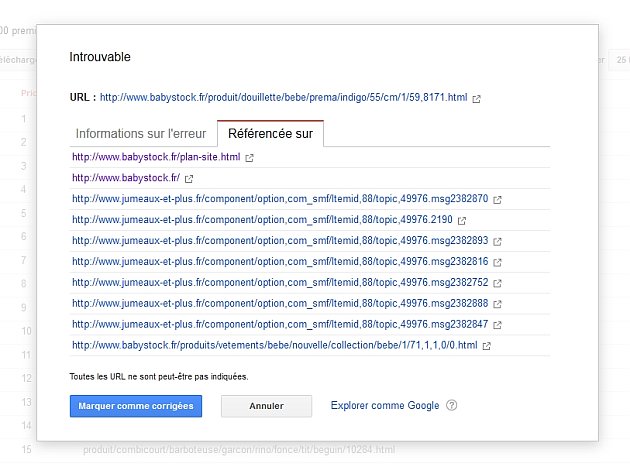
3/ Click on an error line to display the details. 4/ Click on the "Linked from" tab. This is where it all happens.

We have seen internal errors. We realize that Google displays 2 types of 404 errors: those coming from the site itself (internal errors — in the example: babystock.fr) and those coming from external sites. Remember, you have already corrected all your internal errors, which means the problem concerning them will resolve itself. If Google only shows you internal 404 errors, you can click "Mark as fixed". If the error returns, Google will show it to you again. That leaves errors coming from external sites. In the example, we see that links from the site jumeaux-et-plus.fr point to pages that no longer exist on the site. By clicking on the URLs, you can view the external site to see what's happening. See the image below.

It's up to you to redirect the non-existent URLs with a 301 redirect to point to the page of your choice on your site (a similar article, the parent category, etc.). In the framework of the sites we develop, a simple interface allows you to manage this. If you use CMS platforms, some offer solutions of varying quality. There are also plugins designed for various CMS on the market. If not, you will have to perform your redirects by adding them to your .htaccess file. I admit it's a bit more complicated and risky if you don't know what you're doing...
L’optimisation technique d’un site web passe par la correction des erreurs, la mise en place de redirections propres et l’amélioration de l’indexation pour garantir de meilleures performances sur Google.
Support Ticket
Submit a support request